
Short, action-oriented guides for each stage of the product.
Help Center
Guides, answers and support for using Kwoot properly.
Find the essential guides to configure Kwoot, train your team and quickly get a response when a point is blocked.
Categories
Choose the topic you want to configure.
5 guides First steps
Configure the location, branding, legal information and visible texts.
See the guides → 4 guides Billing & paymentDeposit, invoices, bank details, taxes and commercial proposal.
See the guides → 7 guides Public Quote wizardConfigure the steps, messages, fields and choices offered to customers.
See the guides → 4 guides Menus, drinks & extrasCreate offers, prices, VAT, additional options and salable compositions.
See the guides → 6 guides Spaces & availabilitySpaces, capacities, consumption minimums, closures and availability.
See the guides → 2 guides PricingDynamic rules, seasonality and calculations to be checked before going online.
See the guides → 4 guides Quote, customer & follow-upDocuments, customer portal, customer history and useful daily figures.
See the guides → Popular guides
Guides to prepare as a priority.
The most important settings now have their own dedicated page, with steps and screenshots.
32 guides
All Kwoot customization guides.
Each link opens a dedicated page with the steps and screenshots of the setting concerned.
5 guides
First steps
Configure the location, branding, legal information and visible texts.
General Enter restaurant information
Start with the information visible on documents, customer portal and emails: public name, country, address, telephone, email and website.
Open guide → Legal Add legal informationLegal numbers avoid incomplete documents. They are especially useful for quotes, invoices, T&Cs and formal exchanges with companies.
Open guide → Base Set currency and threshold for full private eventThese two settings structure the entire process: the currency displayed everywhere and the number of guests from which the form switches to total private event.
Open guide → Appearance Add logo and main colorThe logo and main color provide continuity between your site, the form, the quote, the customer portal and the emails.
Open guide → Appearance Customize the footer, acknowledgments and termsFooter text, conditions and their visibility avoid generic messages. They can be displayed on quotes, invoices and emails according to your needs.
Open guide → 4 guides
Billing & payment
Deposit, invoices, bank details, taxes and commercial proposal.
Payment Configure bank details
Bank details are used for deposits, balances and invoices. They must be easy to read to avoid poorly referenced payments.
Open guide → Payment Pay deposit, balance, invoices and customer cancellationThis block defines what the customer must pay to confirm, when the balance is due and until when they can request a cancellation.
Open guide → Taxes Configure VAT, taxes and service chargesTax rates change the calculation of menus, drinks and extras. They must be validated with your accountant before launch.
Open guide → Documents Prepare the commercial proposalThe commercial proposal makes the quote clearer for important events. It must reflect your style, your arguments and your conditions.
Open guide → 7 guides
Public Quote wizard
Configure the steps, messages, fields and choices offered to customers.
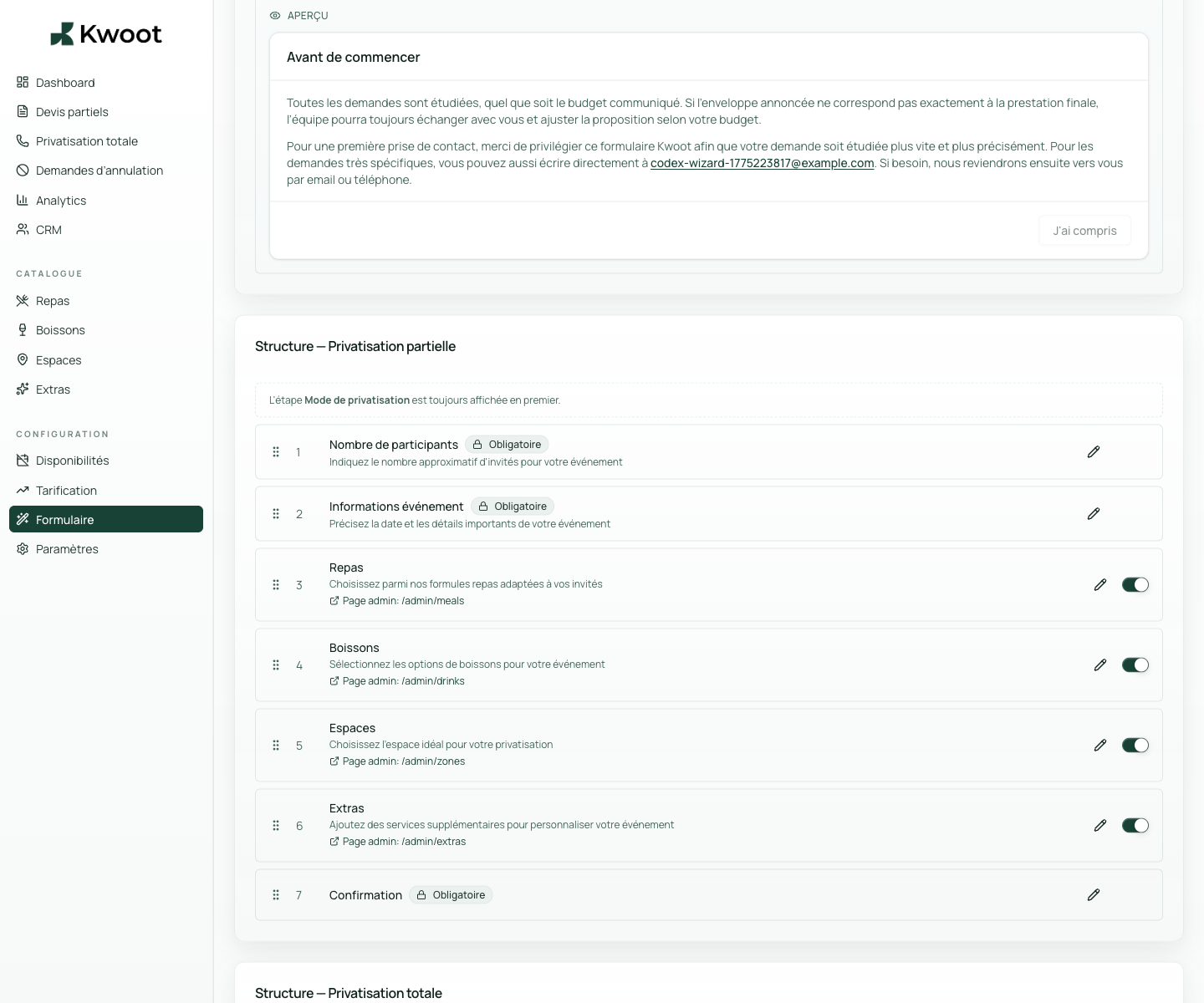
Form Add an intro pop-up to the form
The pop-up serves to reassure the customer before they begin: response time, information requested, useful contact or clarification on private event.
Open guide → Form Activate, deactivate and rename quote wizard stepsYou can keep only the steps useful to your sale: participants, event, meals, drinks, spaces, extras and confirmation.
Open guide → Form Modify field labels and placeholdersThe words on the form should speak like your team. You can adapt the wording, examples and help to avoid questions afterwards.
Open guide → Form Customize the total private event formWhen the customer exceeds your threshold, Kwoot can directly request the essential information for a complete private event, without too long a journey.
Open guide → Form Create the types of events offeredBirthday, seminar, cocktail, civil wedding, company dinner: these labels help the client to recognize themselves and the team to filter requests.
Open guide → Integration Share the direct link or embed the widget on your siteThe form can be sent by direct link or integrated into your site. This is what makes it possible to replace a simple “contact us” button.
Open guide → Emails Control emails sent to the client and the teamThe email tab allows you to understand what the customer receives at each stage: loan quote, deposit, balance, confirmation or internal notification.
Open guide → 4 guides
Menus, drinks & extras
Create offers, prices, VAT, additional options and salable compositions.
Meal Create menus and meal plans
Menus should be specific enough to sell, but not too long. Kwoot can display seated options, cocktails, tapas or specific requests.
Open guide → Meal Configure personalized menus, tapas and validity periodsFor restaurants that create tailor-made menus, you can prepare items, validity periods and selection rules.
Open guide → Drinks Create drink packagesDrinks can be sold per person, as a package or with a specific request. The goal is for the customer to quickly understand what is included.
Open guide → Extras Add extras and additional servicesExtras avoid forgotten quotes: technology, cloakroom, decoration, DJ, private event of terrace, additional staff or fixed costs.
Open guide → 6 guides
Spaces & availability
Spaces, capacities, consumption minimums, closures and availability.
Spaces Create spaces, categories and capacities
Each zone must correspond to a real salable space: entire room, private lounge, terrace, bar, floor or combination of rooms.
Open guide → Spaces Set consumption minimums per spaceThe minimum spend must be configured in the right place to avoid unclear negotiations. Kwoot can display it and take it into account in the files.
Open guide → Spaces Create zone combosCombos allow several spaces to be sold together: room + terrace, lounge + bar, full floor or larger partial private event.
Open guide → Spaces Prepare weather options for outdoor spacesFor a terrace or rooftop, the weather alert allows you to anticipate a fallback solution, another date or a marquee option.
Open guide → Diary Define available times and periodsAvailability helps the client choose a realistic date and prevents the team from dealing with impossible requests.
Open guide → Diary Add exceptional closuresClosures avoid requests on blocked dates: holidays, work, internal events, private event already signed or seasonal closure.
Open guide → 2 guides
Pricing
Dynamic rules, seasonality and calculations to be checked before going online.
Pricing Create a price rule per day or period
Dynamic pricing allows you to increase the price during the most popular times: Friday evening, Saturday, December, brunch, high season.
Open guide → Pricing Create a seasonal ruleA seasonal rule covers an entire period: end-of-year celebrations, trade fairs, high tourist season or months of high demand.
Open guide → 4 guides
Quote, customer & follow-up
Documents, customer portal, customer history and useful daily figures.
Estimate Check quotes, documents and statuses
After personalization, quotes must remain simple to follow: draft, sent, signed, deposit expected, paid or archived.
Open guide → Customer Control the experience in the customer portalThe client portal is the page that the client consults to follow their file, sign, find documents and verify payments.
Open guide → CRM Organize customer files and historyEven if it's not a design tweak, it's an important business customization: your customers, businesses and histories must remain clean.
Open guide → Follow up Customize your tracking routineThe dashboard and key figures cannot be adjusted like a logo, but they must become your routine: what to raise, what to sign, what to cash out.
Open guide →No guide matches this search.
Support
Three levels of help depending on your needs.
An entry point for configuration or route questions.
Help with resuming your existing offers, rules and documents.
Can't find the answer?
Send your question to the Kwoot team with the context of your establishment.